


Hệ thống
This content is not available in your language yet.
1. Hình ảnh giao diện
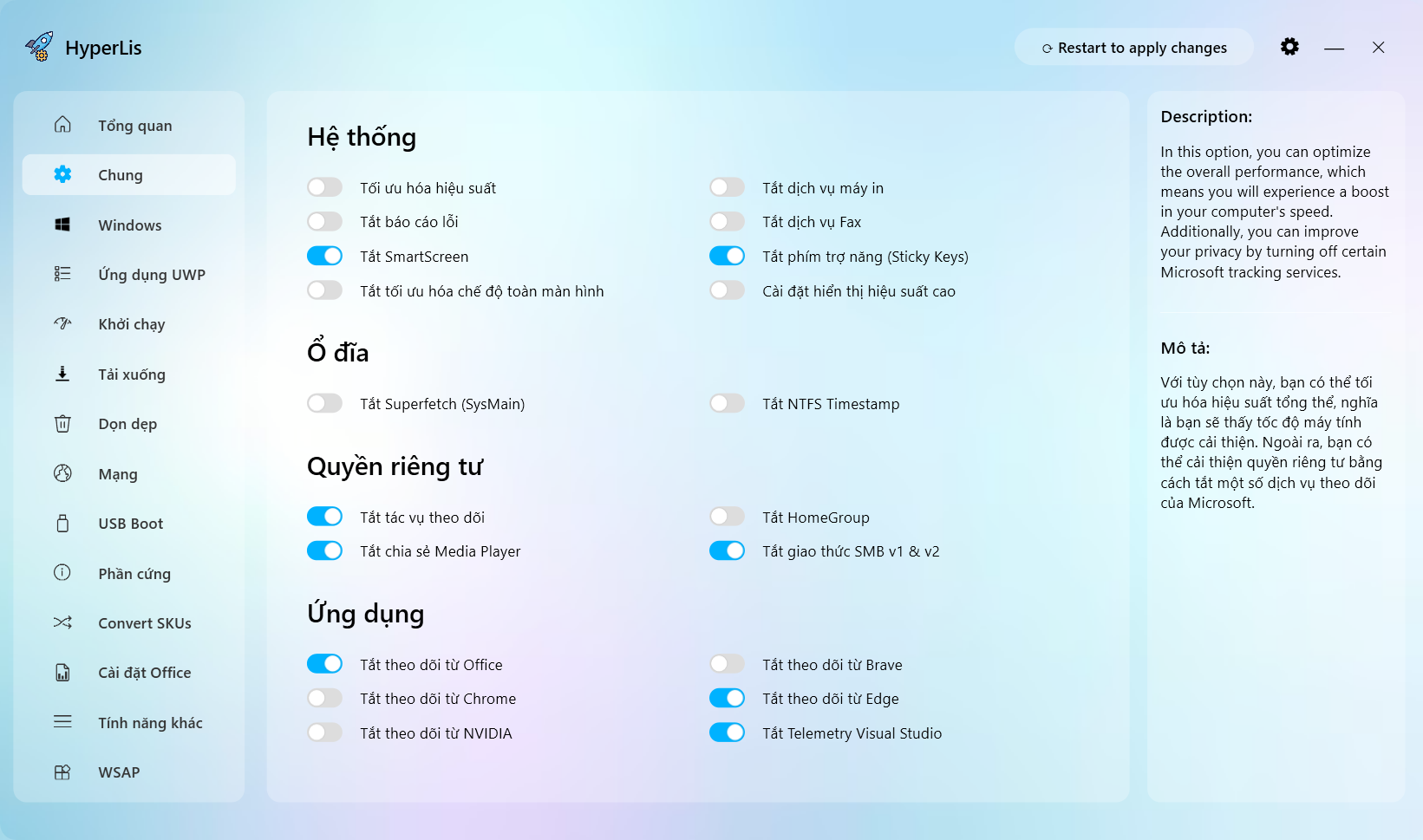
2. Tối ưu hóa hiệu năng
Điều chỉnh một số cài đặt hệ thống để tăng hiệu suất:
- Tắt hiệu ứng hình ảnh, độ trễ khởi động và tối ưu hóa ứng dụng nền
- Đặt lịch trình bộ xử lý để ưu tiên ứng dụng đang chạy
- Giảm mức sử dụng bộ nhớ của các tiến trình hệ thống
Giá trị Registry bị ảnh hưởng
HKEY_LOCAL_MACHINE\SYSTEM\CurrentControlSet\Control\CrashControlCrashDumpEnabled=3(REG_DWORD)
HKEY_CURRENT_USER\Software\Microsoft\Windows\CurrentVersion\Explorer\AutoCompleteAppend Completion="yes"(REG_SZ)AutoSuggest="yes"(REG_SZ)
HKEY_CURRENT_USER\Control Panel\DesktopMenuShowDelay="200"(REG_SZ)AutoEndTasks="1"(REG_SZ)HungAppTimeout="1000"(REG_SZ)WaitToKillAppTimeout="2000"(REG_SZ)LowLevelHooksTimeout="1000"(REG_SZ)
HKEY_LOCAL_MACHINE\SOFTWARE\Microsoft\Windows NT\CurrentVersion\Multimedia\SystemProfileNetworkThrottlingIndex=-1(0xFFFFFFFF) (REG_DWORD)SystemResponsiveness=0(REG_DWORD)
HKEY_LOCAL_MACHINE\SOFTWARE\Microsoft\Windows NT\CurrentVersion\Multimedia\SystemProfile\Tasks\GamesGPU Priority=8(REG_DWORD)Priority=6(REG_DWORD)Scheduling Category="High"(REG_SZ)
3. Tắt báo cáo lỗi
Ngăn Windows tự động gửi báo cáo lỗi và nhật ký sự cố đến Microsoft.
- Vô hiệu hóa dịch vụ Windows Error Reporting (WER)
- Ngăn báo cáo sự cố tự động
- Cải thiện quyền riêng tư bằng cách không gửi dữ liệu chẩn đoán
Giá trị Registry bị ảnh hưởng
HKEY_LOCAL_MACHINE\SOFTWARE\Policies\Microsoft\Windows\Windows Error ReportingDisabled=1(REG_DWORD)
HKEY_LOCAL_MACHINE\SOFTWARE\Policies\Microsoft\PCHealth\ErrorReportingDoReport=0(REG_DWORD)
HKEY_LOCAL_MACHINE\SOFTWARE\Microsoft\Windows\Windows Error ReportingDisabled=1(REG_DWORD)
HKEY_LOCAL_MACHINE\SYSTEM\CurrentControlSet\Services\WerSvcStart=4(REG_DWORD)
HKEY_LOCAL_MACHINE\SYSTEM\CurrentControlSet\Services\wercplsupportStart=4(REG_DWORD)
4. Tắt SmartScreen
Tắt bộ lọc Microsoft SmartScreen kiểm tra file tải xuống và trang web.
- Loại bỏ hộp thoại cảnh báo ‘Windows đã bảo vệ máy tính của bạn’
- Hữu ích nếu bạn thường xuyên cài đặt phần mềm từ nguồn tin cậy
Lưu ý
Tắt tính năng này làm giảm bảo vệ chống file độc hại.
Giá trị Registry bị ảnh hưởng
HKEY_CURRENT_USER\Software\Microsoft\Windows\CurrentVersion\Policies\AttachmentsSaveZoneInformation=1(REG_DWORD)
HKEY_LOCAL_MACHINE\Software\Microsoft\Windows\CurrentVersion\Policies\AttachmentsScanWithAntiVirus=1(REG_DWORD)
HKEY_LOCAL_MACHINE\SOFTWARE\Policies\Microsoft\Windows\SystemShellSmartScreenLevel="Warn"(REG_SZ)EnableSmartScreen=0(REG_DWORD)
HKEY_LOCAL_MACHINE\SOFTWARE\Microsoft\Windows\CurrentVersion\ExplorerSmartScreenEnabled="Off"(REG_SZ)
HKEY_LOCAL_MACHINE\SOFTWARE\Microsoft\Internet Explorer\PhishingFilterEnabledV9=0(REG_DWORD)
HKEY_CURRENT_USER\Software\Microsoft\Windows\CurrentVersion\AppHostPreventOverride=0(REG_DWORD)
HKEY_LOCAL_MACHINE\SOFTWARE\Microsoft\Windows\CurrentVersion\Notifications\Settings\Windows.SystemToast.SecurityAndMaintenanceEnabled=0(REG_DWORD)
5. Tắt tối ưu hóa chế độ toàn màn hình
Vô hiệu hóa Fullscreen Optimizations (Tối ưu hóa toàn màn hình) được giới thiệu trong Windows 10.
- Có thể giúp cải thiện khả năng tương thích và FPS trong một số game cũ
- Ngăn Windows quản lý chế độ toàn màn hình của ứng dụng
- Hữu ích cho game thủ thi đấu cần mọi khung hình
Giá trị Registry bị ảnh hưởng
HKEY_CURRENT_USER\System\GameConfigStoreGameDVR_DXGIHonorFSEWindowsCompatible=1(REG_DWORD)
6. Tắt dịch vụ in ấn
Dừng dịch vụ Print Spooler của Windows khỏi việc chạy.
- Giải phóng tài nguyên hệ thống nếu bạn không dùng máy in
- Giảm nguy cơ bị tấn công từ các lỗ hổng kiểu PrintNightmare
Lưu ý
Bạn sẽ KHÔNG thể in tài liệu khi tính năng này bị tắt.
Giá trị Registry bị ảnh hưởng
HKEY_LOCAL_MACHINE\SYSTEM\CurrentControlSet\Services\SpoolerStart=3(REG_DWORD)
7. Tắt dịch vụ Fax
Dừng dịch vụ Fax và Scan của Windows.
- Giải phóng tài nguyên hệ thống vì hầu hết người dùng không dùng fax
- Ngăn dịch vụ nền không cần thiết chạy
Lưu ý
Bạn sẽ không thể gửi hoặc nhận fax khi bị tắt.
Giá trị Registry bị ảnh hưởng
HKEY_LOCAL_MACHINE\SYSTEM\CurrentControlSet\Services\FaxStart=4(REG_DWORD)
8. Tắt phím dính (Sticky Keys)
Tắt phím tắt trợ năng ‘Sticky Keys’ (nhấn Shift 5 lần).
- Ngăn hộp thoại khó chịu xuất hiện khi chơi game
- Cũng tắt phím tắt Toggle Keys và Filter Keys
- Được khuyến nghị cho game thủ hay nhấn Shift nhanh
Giá trị Registry bị ảnh hưởng
HKEY_CURRENT_USER\Control Panel\Accessibility\StickyKeysFlags="506"(REG_SZ)
HKEY_USERS\.DEFAULT\Control Panel\Accessibility\StickyKeysFlags="506"(REG_SZ)
HKEY_CURRENT_USER\Control Panel\Accessibility\Keyboard ResponseFlags="122"(REG_SZ)
HKEY_USERS\.DEFAULT\Control Panel\Accessibility\Keyboard ResponseFlags="122"(REG_SZ)
HKEY_CURRENT_USER\Control Panel\Accessibility\ToggleKeysFlags="58"(REG_SZ)
HKEY_USERS\.DEFAULT\Control Panel\Accessibility\ToggleKeysFlags="58"(REG_SZ)
9. Cài đặt hiển thị cho hiệu suất
Điều chỉnh cài đặt hiển thị và hình ảnh để đạt hiệu suất tối đa.
- Tắt hoạt ảnh, bóng đổ và hiệu ứng hình ảnh trong Windows
- Tăng tốc độ hiển thị cửa sổ và phản hồi giao diện
- Tốt nhất cho phần cứng cũ hoặc người dùng ưu tiên tốc độ hơn thẩm mỹ
Giá trị Registry bị ảnh hưởng
HKEY_CURRENT_USER\Control Panel\DesktopDragFullWindows="1"(REG_SZ)MenuShowDelay="200"(REG_SZ)
HKEY_CURRENT_USER\Control Panel\Desktop\WindowMetricsMinAnimate="0"(REG_SZ)
HKEY_CURRENT_USER\Control Panel\KeyboardKeyboardDelay=0(REG_DWORD)
HKEY_CURRENT_USER\Software\Microsoft\Windows\CurrentVersion\Explorer\AdvancedListviewAlphaSelect=1(REG_DWORD)ListviewShadow=0(REG_DWORD)TaskbarAnimations=0(REG_DWORD)TaskbarMn=0(REG_DWORD)TaskbarDa=0(REG_DWORD)
HKEY_CURRENT_USER\Software\Microsoft\Windows\CurrentVersion\Explorer\VisualEffectsVisualFXSetting=3(REG_DWORD)
HKEY_CURRENT_USER\Software\Microsoft\Windows\DWMEnableAeroPeek=0(REG_DWORD)